You’ve polished your piano track until every chord shines, but the video timeline is still blank. You have two options: drop the song into a cartoon AI music video app for an instant animation, or go full DIY with keyframes and late-night renders that cost hours. This guide ranks 6 workflows - 3 AI apps and 3 DIY pipelines - by the sharpness they deliver per hour of your time.
What “Sharp” Actually Means
Two things decide it, and most roundups only measure the first.
Temporal sharpness asks whether every detail stays where it belongs from frame to frame.
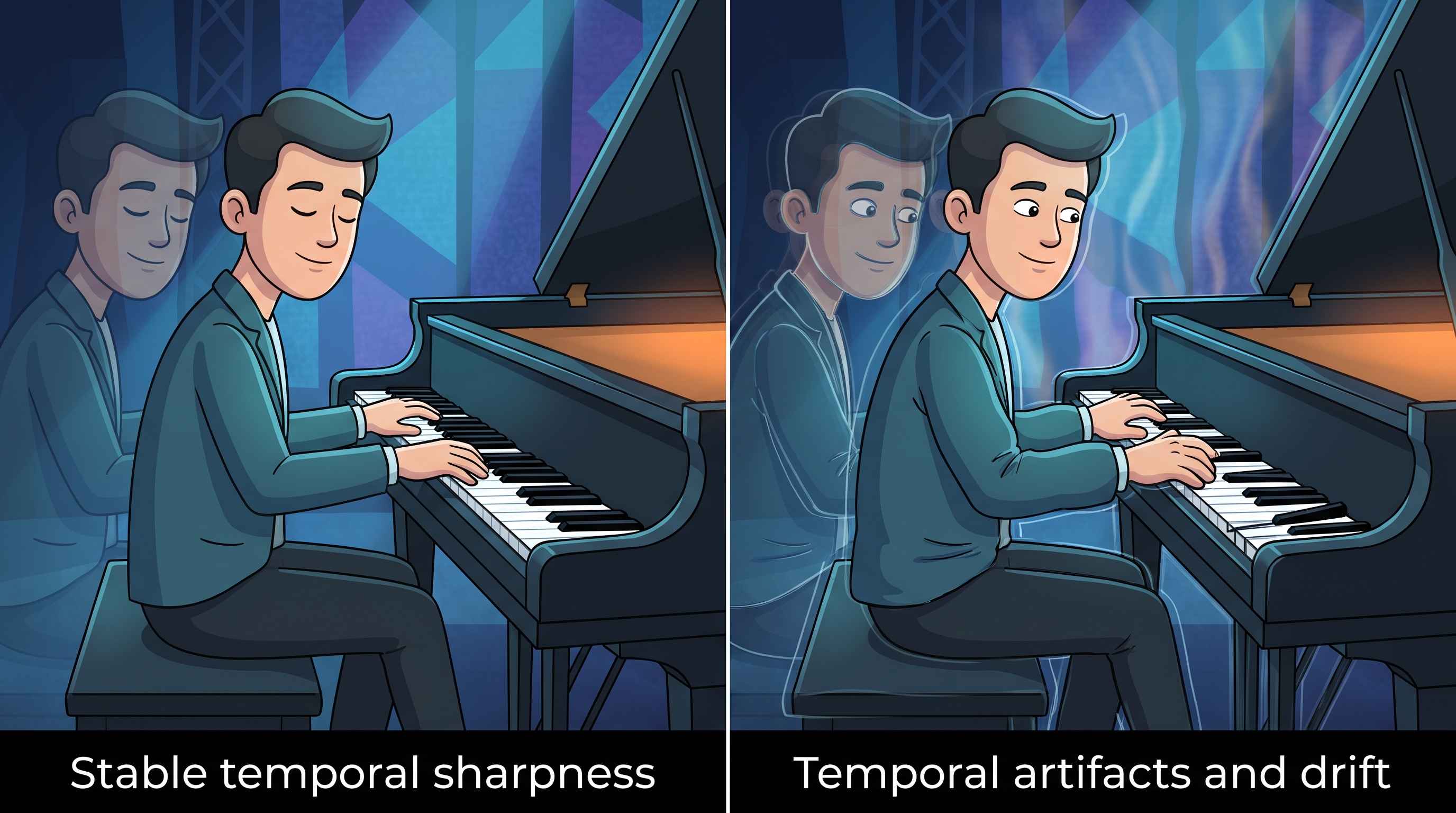
Track your character’s eyes, hands, and clothing: any drift, swell, or snap-back signals instability. Watch the piano itself; if black keys shrink or slide during rapid arpeggios, the illusion breaks. Line weight should stay even as the camera glides. Academic research on generative cartoons, including the 2025 ToonComposer model, notes that separating keyframing and colorization stacks errors and produces artifacts that break immersion.
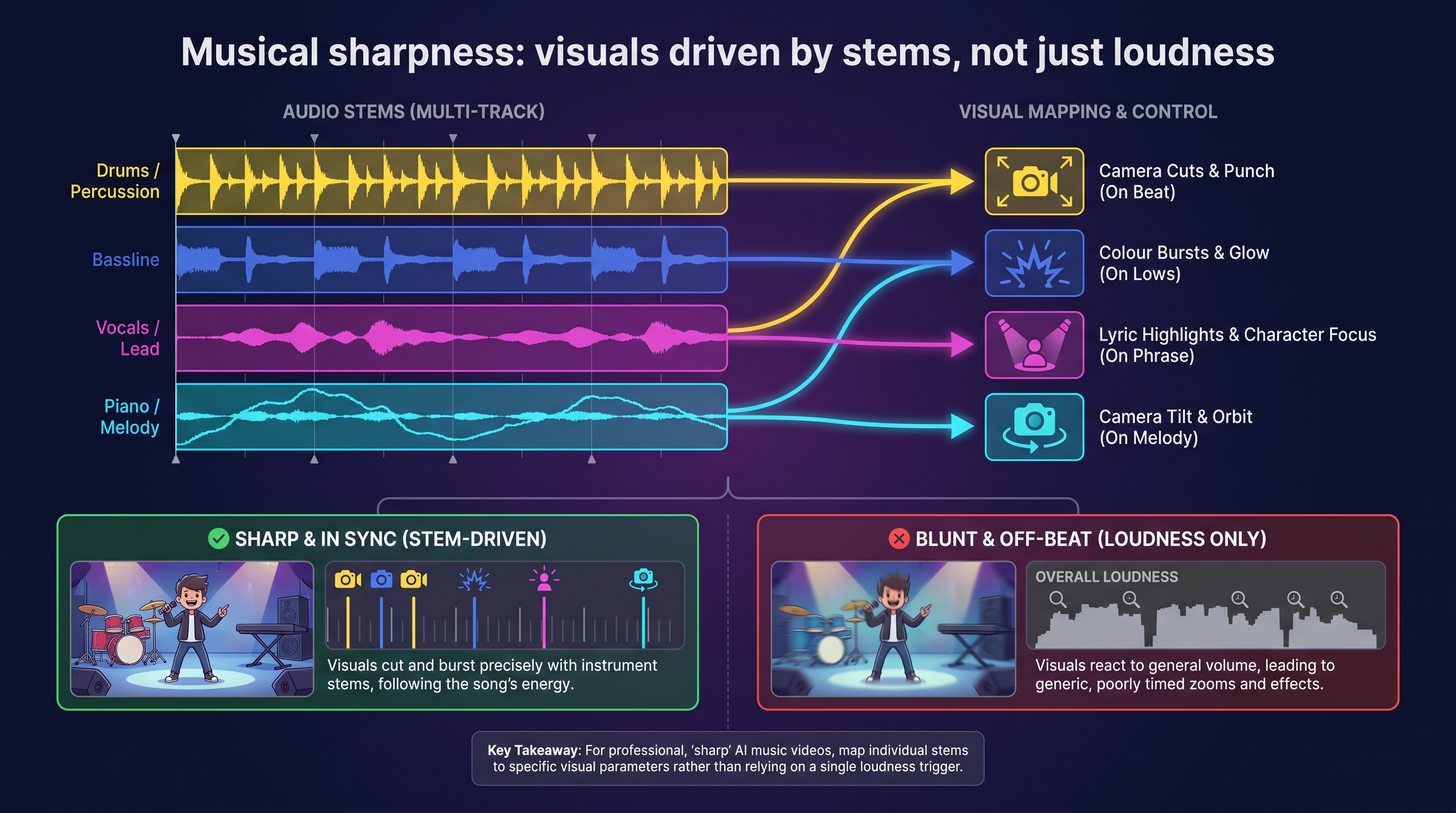
Musical sharpness asks whether the animation moves with your song or merely next to it. Some engines react only to loudness, so every cymbal crash triggers the same zoom even when the melody is whisper-soft. Others split the track into stems so each instrument drives a specific visual control.
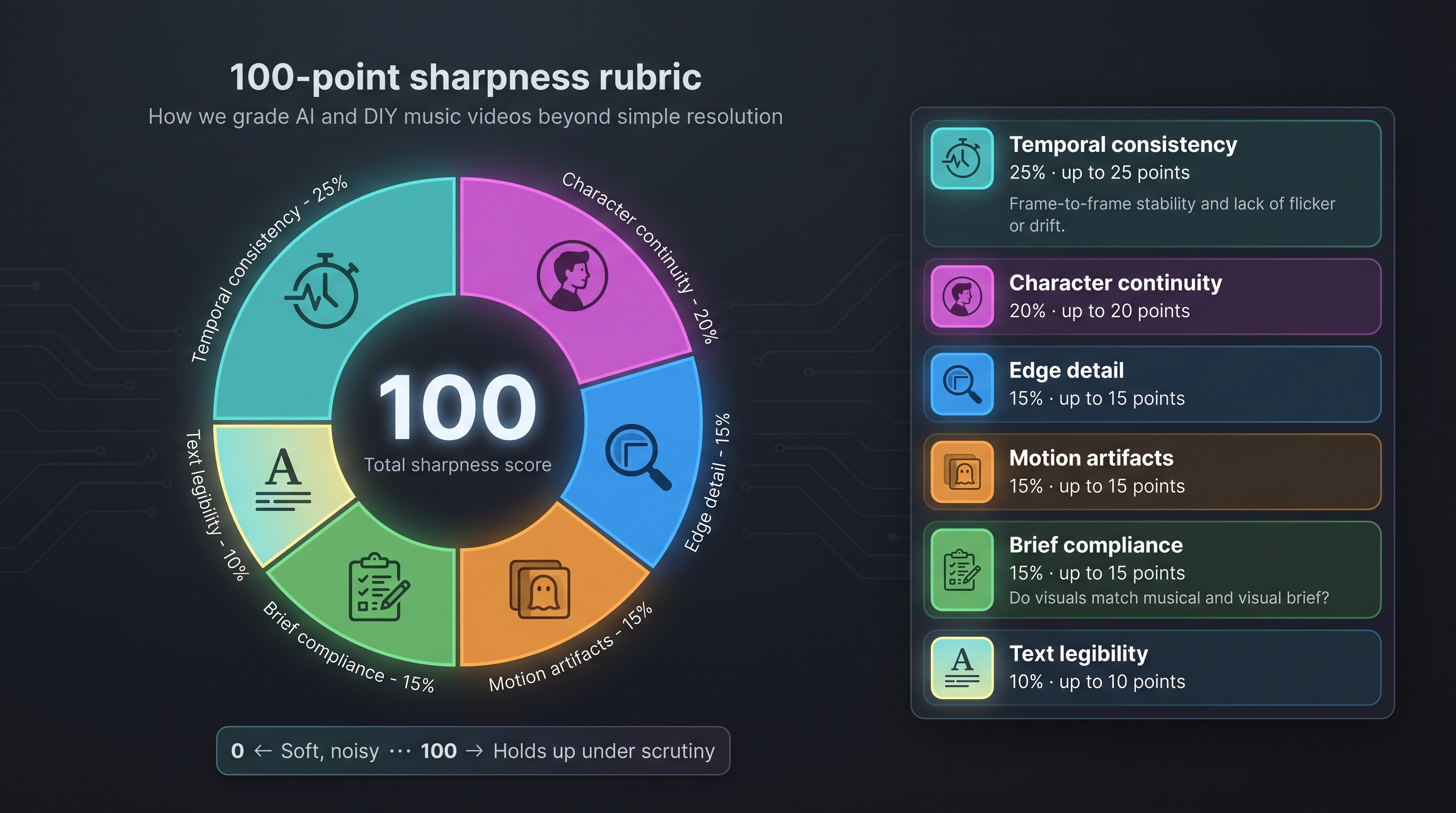
We scored every workflow on both, using a 100-point rubric: 25 percent temporal consistency, 20 percent character continuity, 15 percent edge detail, 15 percent motion artifacts, 15 percent brief compliance, and 10 percent text legibility.
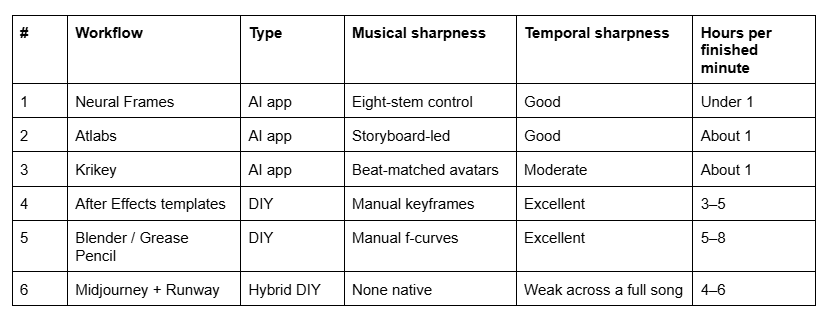
Ranked At A Glance
1. Neural Frames: Best Overall For Stem-Level Control
Neural Frames extracts eight stems from your upload — drums, bass, vocals, melody and four more — and maps each one to colour, camera, or effects. You can connect any stem to any parameter mid-edit, muting piano-driven camera tilts while bass still pumps the colour bursts. In Autopilot mode it converts those stems into a beat-synced music video in minutes, and you can learn moreabout its three creation modes that pre-chart verses, choruses, and drops for you.
It is a paid platform with no free tier, and 4K upscaling is included on the Ninja and Nirvana plans. You get stem-level automation plus a frame-by-frame editor for detailed tweaks, which is what earns it the top slot: it is the only entry here that hears the arrangement rather than the volume.
Best for piano-led singles where the chorus needs to land visually. Weakness: the deeper controls take a session to learn.
2. Atlabs: Best For Guided Cartoon Storyboards
Atlabs opens with an auto-generated storyboard — characters, locations, and colour keys laid out like a picture book. Consumer plans cap exports at 1920 × 1080, but built-in lip-sync and consistency tools help independent artists finish a full song quickly.
Best for children’s channels, lessons, or explainer pieces where a clear narrative beats reactive motion. Weakness: no native 4K, and you should confirm the current export ceiling before committing to a spec.
3. Krikey: Best For Browser-Based 3-D Avatars
Krikey runs entirely in the browser: rig an avatar, upload your track, and watch facial expressions and gestures sync to the beat. Nothing to install, which suits a quick lesson intro recorded between students.
Best for single-performer videos and vertical shorts. Weakness: the site mentions “high-definition” exports but lists no pixel count, so verify before you promise a spec.
4. After Effects Templates: Best Manual Control Per Hour
Open a blank project and you become the automation. Import your song, drop a template on the timeline, then choose Animation › Keyframe Assistant › Convert Audio to Keyframes. Every kick and snare turns into data you can map to scale, opacity, or colour (Adobe After Effects help documentation).
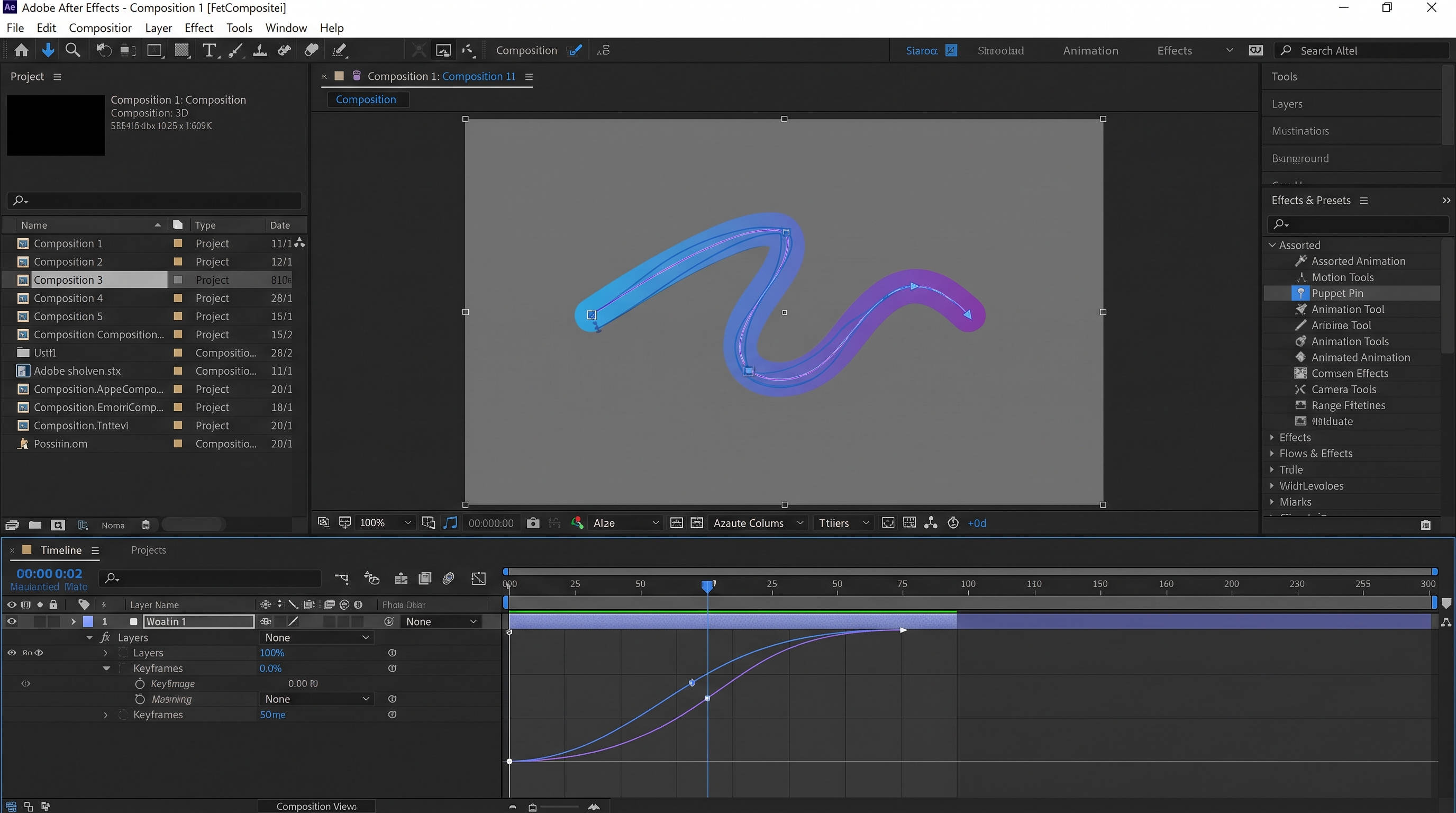
Then comes the grind: swapping placeholder art in nested comps, taming expressions that overswing on quiet passages, nudging lyric layers frame by frame. The payoff is total control down to piano-key geometry.
Best for brand-safe work where every frame must be inspected. Weakness: a 60-second edit can absorb three to five active hours before the first full render.
5. Blender Or Grease Pencil: Best For Full Ownership
Blender costs nothing in cash but plenty in time. You step into a full 3-D sandbox: sculpt a concert hall, rig cartoon fingers that press each key, light the scene like a short film. Animation › Bake Sound to F-Curves turns a waveform into curves, letting a hi-hat flicker spotlights while a bass slide tilts the camera — each link a manual node you wire and test.
Rendering is the toll. On a current GPU a stylised 3840 × 2160 frame can take a minute or two, and a 60-second solo runs to 1,800 frames.
Best for a signature look nothing else can produce. Weakness: the slowest entry here by a wide margin.
6. Midjourney Plus Runway: Best For Hero Shots Only
Think of this as a digital collage: one tool paints the stills, the other sets them in motion.
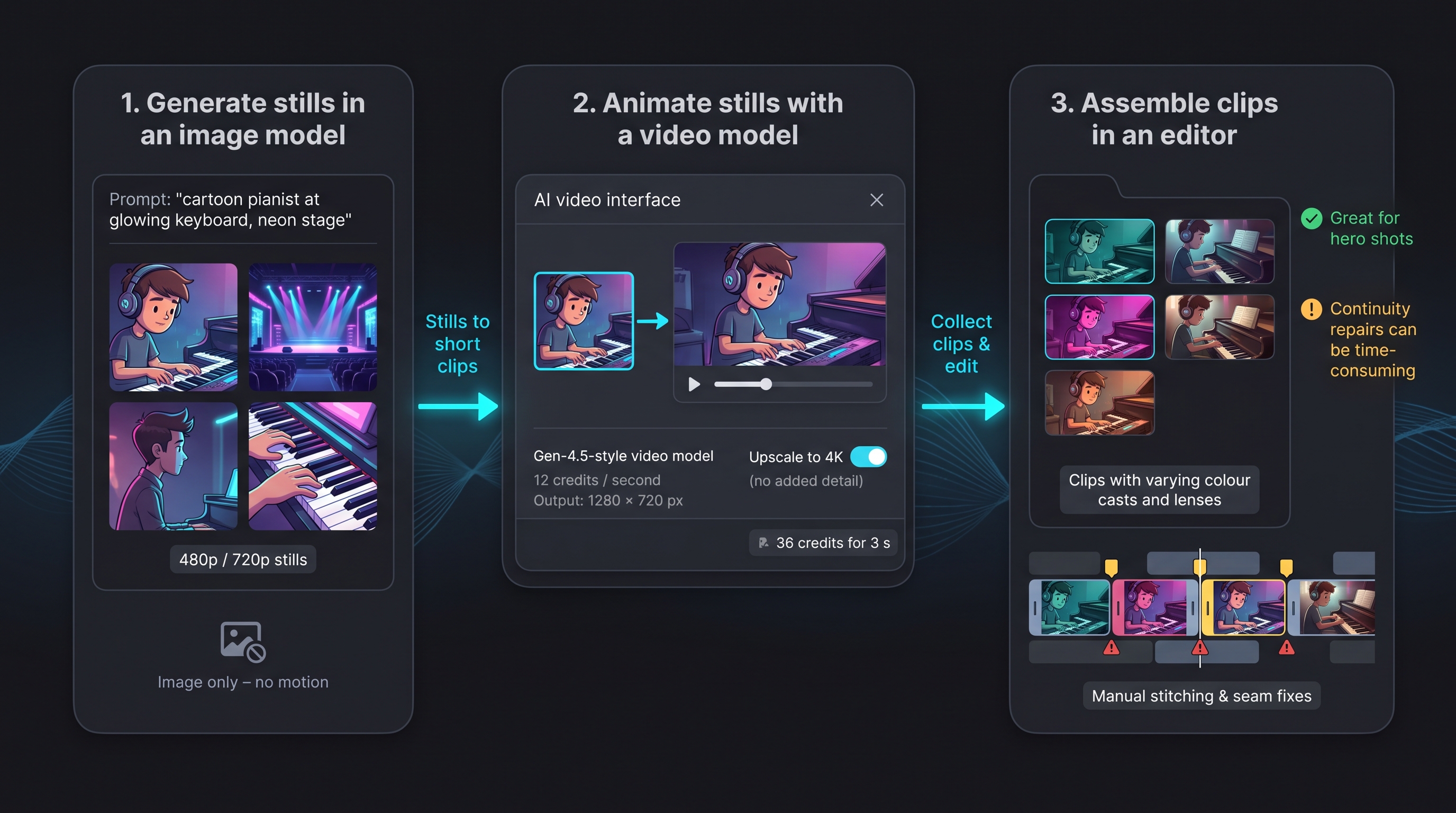
Generate character turnarounds and background plates in Midjourney, then animate them in Runway, which bills per second of output at a rate that rises with resolution — check the live pricing page before budgeting. An “upscale to 4K” option enlarges the file without adding new detail.
Repeat for every section and you collect clips with slightly different colour casts and lenses that a separate editor must glue together.
Best for two or three showcase moments. Weakness: it ranks last on full-song continuity — anatomy and angles drift between generations, and repairing the cut often takes longer than creating the clips.
How We Scored Labour And Cost
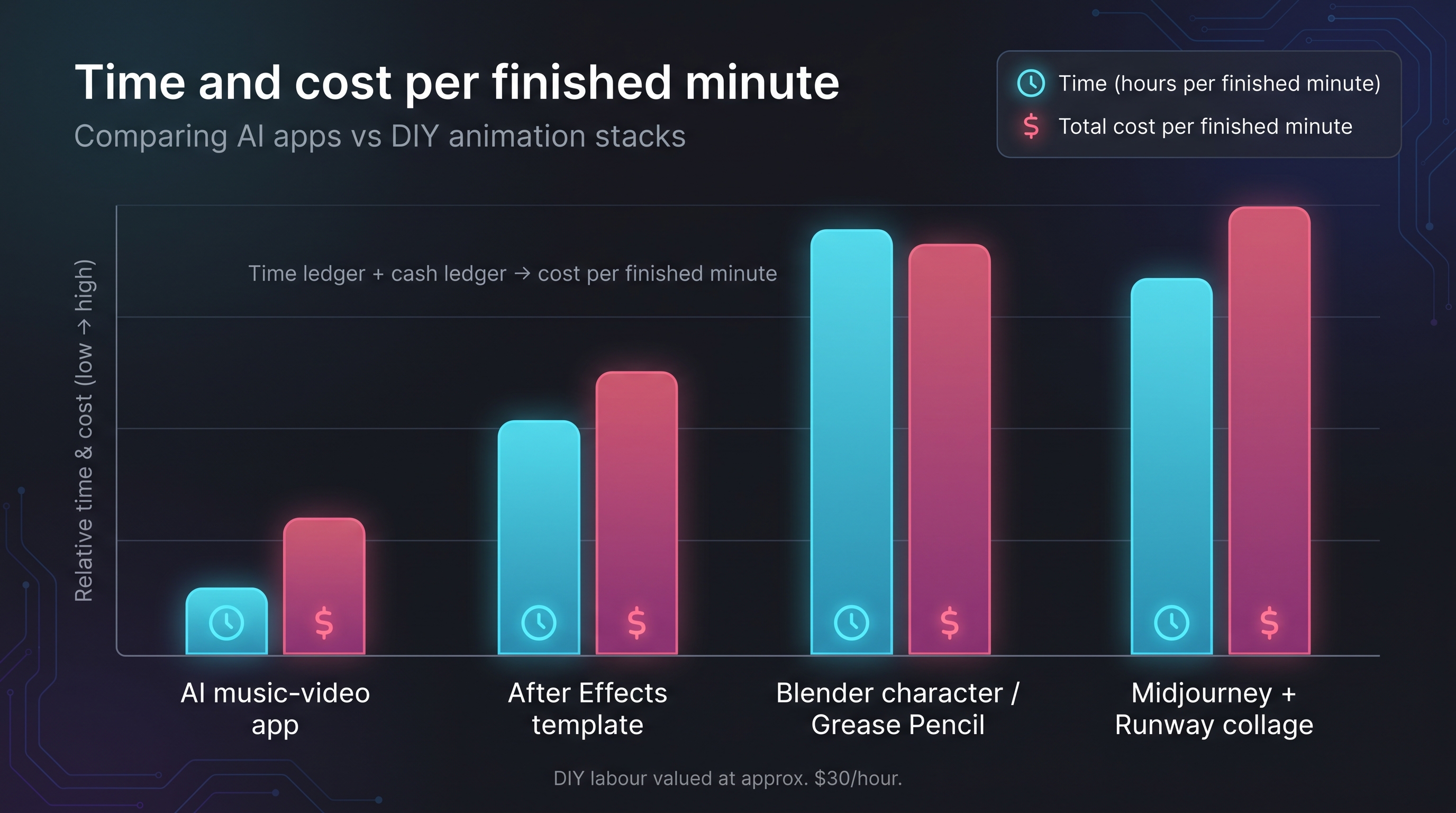
Crisp pixels lose value if they swallow a weekend.
Track every active minute — setup, prompt writing, regenerations, final edits — and log render waits, because a progress bar ties up both your computer and your focus. List subscription fees, credit packs, template licences, and cloud-render charges, then convert DIY hours to a notional rate so sweat equity sits beside cash. Divide total spend by usable video minutes for a single comparable figure.
Then test revision resilience with three changes: swap a background while keeping the character, move a visual accent from the overall beat to the piano melody, and repair a weak five-second scene. An app that regenerates only the affected shot finishes in minutes; a DIY stack may need comps rebuilt and every expression rechecked.
To compare fairly, hold the audio constant — one 55-second solo piano excerpt with rubato and wide dynamic swells, and a second version of the same part plus drums, bass, and light vocals to test multi-stem reactivity. Same tempo map, key, and loudness target for both.
Which One Should You Pick?
- Weekly covers and social clips. Speed beats perfection. Drop Monday’s cover into a music-video appand export both orientations in one sitting. DIY pipelines scale poorly here.
- Piano-led singles. Let the app build a reactive backdrop, then jump into an editor to hand-set lyrics and swap one or two hero shots. Roughly two to three hours per finished minute.
- Beginner lessons. Rigged avatars or Grease Pencil overlays lock joints and wrist angles; generative scenes handle intros and transitions.
- Flagship releases. Cover the track end to end with an app, then craft signature shots in Blender or Runway. Six or more active hours per finished minute, but maximum creative freedom.
Whatever you pick: lock the style before generating motion, generate for the final aspect ratio, use three or four strong angles rather than ten middling ones, set lyrics and titles by hand, and upscale only the approved cut.
The Verdict
For sharpness per hour, a stem-aware AI app wins outright. It holds musical sharpness far better than a template because it hears the arrangement rather than the volume, and it delivers a full-song cut before a DIY pipeline has finished its storyboard.
DIY still wins on temporal sharpness. Nothing generative matches a hand-keyframed piano where every black key stays put through a fast arpeggio, and nothing beats manual control when a syncopated snare needs the frame to move a sixteenth early.
The honest answer for most keyboard creators is neither extreme. Let the app cover the full track, then hand-craft the moments listeners remember — the opening chord, the chorus drop, the closing arpeggio. Viewers anchor on those peaks, and the whole video reads sharper without turning every frame into a time sink.
Rights, Disclosure, And Monetisation Checks
AI does not replace licensing. Upload only material you created or hold in writing. The U.S. Copyright Office’s February 2025 report notes that human creativity plus documented control equals stronger ownership, so save every prompt, reference image, storyboard, and colour grade as proof you directed the work.
YouTube flags realistic synthetic scenes: tick the Altered or Synthetic box during upload if a video could mislead, and note that the platform’s repetitious-content policy warns mass-produced AI videos risk demonetisation. Label realistic AI scenes, add enough creative direction that each upload stands as original work, and your sharper visuals stay on the right side of policy, revenue, and viewer trust.